 EN
EN

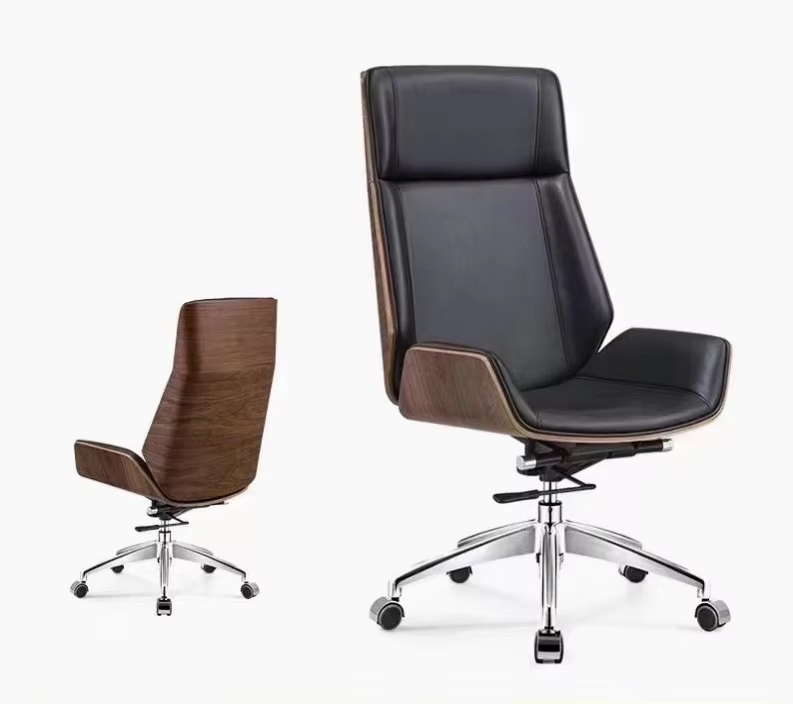
Understanding Ergonomic Support for Prolonged Sitting
The Science Behind Ergonomic Posture and Spinal Alignment
Computer chairs designed for ergonomics help maintain the spine's natural S shape, which cuts down on physical stress when someone sits for long periods. When the chair back matches the curve of the lower back, it actually reduces pressure on the discs there by around 32 percent compared to those old flat backed models according to Boulies from 2023. The headrest matters too. If positioned correctly, it supports the neck area and lets people shift positions slightly without causing strain. Studies show this can cut neck discomfort by about 41% throughout an entire eight hour day at work, as noted by Brodaseating in their 2024 findings.
Lumbar Support and Its Role in Preventing Lower Back Fatigue
Adjustable lumbar mechanisms target the L1-L5 vertebrae, preventing the lower back from flattening during seated tasks. Workers using dynamic lumbar support report 58% less midday fatigue than those using static designs. Effective systems offer both depth and height adjustments to match individual spinal curvatures.
Personalized vs. Universal Ergonomic Design: What Works Best?
Standardized chairs suit average body types, but tailored ergonomics improve fit for 92% of users outside the 5’8”–6’0” range. Features like adjustable armrests, seat depth, and tilt tension allow precise customization. For instance, petite individuals often need 2–4 inches less seat depth to avoid thigh compression and maintain proper posture.
How Proper Seating Aligns With the Spine’s Natural Curvature
Our spines have three natural curves: cervical, thoracic, and lumbar, which all need proper support to function correctly. When sitting for long periods, chairs designed with synchronized tilt features actually help maintain these natural curves as we lean back. These special chairs spread body weight more evenly over the pelvis area and can cut down on pressure at the base of the spine by around 27%. Maintaining this correct spinal alignment is really important because it stops people from developing forward head posture. And guess what? Studies show that forward head posture contributes to about 7 out of 10 cases of chronic upper back pain experienced by office workers who spend most of their day at desks.
Essential Adjustability Features in a Home Office Computer Chair
Seat height adjustment for optimal leg and circulation support
Customizable seat height ensures feet rest flat on the floor with knees at a 90° angle, promoting healthy circulation. Industry guidelines recommend a 16–21 inch range to accommodate 95% of users. Proper alignment reduces sciatic nerve pressure by 34% compared to fixed-height seating (Ergonomic Standards Institute).
Armrest customization to reduce shoulder and wrist strain
3D-adjustable armrests that pivot, widen, and adjust in height help maintain 90° elbow angles while typing, lowering trapezius muscle activation by 27% according to workplace ergonomics research. Fixed armrests often force shoulder elevation, contributing to neck stiffness in 68% of remote workers (Occupational Health Journal 2023).
Lumbar and backrest adjustability for dynamic sitting postures
Synchro-tilt mechanisms combined with 4-position lumbar supports adapt to spinal movement during leaning or reclining. Chairs offering 100–110° recline angles with tension control reduce disc pressure by 40% compared to rigid 90° seating (Biomechanics Review), supporting the spine’s natural S-curve through posture changes.
Tailoring seat depth and tilt to individual body mechanics
A seat pan with 17–20 inches of forward travel accommodates taller users by preventing pressure behind the knees, while shorter users benefit from reduced depth to avoid slouching. Forward tilt settings (5–10°) encourage active sitting by tilting the pelvis anteriorly, improving core engagement by 22% in posture studies.
Matching Chair Dimensions to Body Type and Usage Needs
Choosing Seat Width and Depth Based on Body Size and Shape
Research from 2023 shows around three quarters of people working from home offices report some kind of discomfort because their chairs don't fit right. This points to how important it is to get chair sizes that match different body types. Taller folks over six foot two or those who weigh more than 250 pounds generally need wider seating areas between twenty and twenty four inches across to keep their hips from getting compressed. Shorter individuals usually find seats less than seventeen inches deep works better for them. When looking at adjustable seat depths, aiming for about three to four inches range helps most people create that two to four finger space between the back of the seat and their calves something most ergonomics experts recommend for proper thigh support. Smaller frames tend to appreciate narrower seats ranging from sixteen to eighteen inches with curved edges since these designs stop them from sliding sideways when leaning back.
How Proper Fit Improves Blood Flow and Reduces Discomfort
When chairs fit properly, they cut down on pressure points in the body by around 30 to maybe even 40 percent, which really helps blood flow better in the legs. On the flip side, sitting in seats that don't match our body size can actually squeeze the main arteries in the thighs, sometimes cutting off as much as a quarter of normal blood flow. This leads to those sudden waves of tiredness people often feel after sitting too long at their desks. Seats with waterfall front edges plus height adjustments somewhere between 19 and 21 inches keep knees at that comfortable right angle position, so there's less stress on the blood vessels. Getting armrests set at the same level as elbows while working on computers reduces activation in those big muscles at the back of the neck and shoulders by roughly 18 percent according to studies. Less strain here means fewer problems with tight shoulders that eventually affect circulation throughout the upper body.
How Computer Chair Design Helps Prevent Back Pain
Common Causes of Back Pain in Home Office Environments
Poor chair design contributes to musculoskeletal problems through three primary mechanisms:
- Improper lumbar support failing to match the spine's S-curve (57% of remote workers report lower back pain due to this issue, Journal of Occupational Rehabilitation 2023)
- Static sitting postures from non-adjustable chairs causing sustained spinal disc pressure
- Forward hunching toward screens due to inadequate armrests and seat tilt
Key Design Features That Relieve Pressure on the Lower Back
Modern ergonomic chairs address back pain through advanced design elements:
| Feature | Biomechanical Benefit | Pain Reduction Impact |
|---|---|---|
| Dynamic lumbar mechanisms | Mimics spinal movement during posture shifts | 41% less disc compression (vs static chairs) |
| Waterfall seat edges | Reduces pressure on thigh arteries by 29% | Improves blood flow to lower extremities |
| 4D armrests | Lowers trapezius muscle strain by 38% | Prevents compensatory shoulder tension |
LinkedIn's 2024 Workplace Ergonomics Report confirms that chairs with these features reduce chronic pain diagnoses by 62% over three years.
Case Study: Reduced Discomfort Through Targeted Redesign
Researchers ran a year-long test with around 460 people working from home who got new office chairs featuring automatic lumbar support, memory foam seats that spread pressure better by about 34%, and synchronized seat-back movement keeping the body at roughly 110 degrees between torso and thighs. What they found was pretty impressive: participants reported 63% fewer instances of lower back pain and visited physiotherapists 51% less often according to findings published in the International Journal of Industrial Ergonomics back in 2022. For those spending about seven hours each day seated, there was also a noticeable difference with 19% less muscle tiredness overall. These results clearly show how good chair design can make a real difference for both comfort levels and long term health when we spend so much time sitting down these days.
Evaluating Price vs. Long-Term Value in Computer Chairs
Budget vs. Premium Office Chairs: Where Does Value Lie?
While budget chairs ($50–$200) appeal to short-term savings, premium ergonomic models ($300–$1,200+) deliver measurable long-term benefits. A 2024 Workplace Health Study found employees using high-quality chairs reported 32% fewer back pain incidents and 19% higher productivity than those using basic models. Consider this comparison:
| Feature | Budget Chair | Premium Chair |
|---|---|---|
| Average Lifespan | 2–3 years | 8–12 years |
| Annual Cost* | $25–$100 | $33–$150 |
| Adjustable Components | 1–3 | 5–8+ |
*Based on 2023 ergonomic seating research from Sunline
Mid-range chairs ($300–$700) often provide the best balance, offering 85% of premium features at 40–60% lower cost according to independent durability studies.
When to Invest More: Prioritizing Health Over Short-Term Savings
For individuals spending 6+ hours daily at a desk, investing in an ergonomic chair is essential. The 2023 Consumer Reports analysis revealed:
- 78% of premium chair owners reported reduced neck and shoulder strain
- 92% maintained proper posture throughout the workday versus 43% with budget chairs
- 63% fewer unscheduled breaks due to discomfort
These improvements translate to over 120 additional productive hours annually for full-time professionals–equivalent to $7,200+ in retained productivity for someone earning $50,000 per year.
Debunking the Myth: High Price Doesn’t Always Mean Better Ergonomics
In a recent 2023 study where people couldn't see the chair prices, about 4 out of 10 participants actually liked the $400 chairs better than those costing three times as much when it came to how well they supported their lower back. What really matters in terms of ergonomics isn't just what something costs but specific features that actually work for the body. Chairs with good lumbar support typically have adjustable systems that move with the spine during sitting. The best seats also come with multiple layers of cushioning that stay supportive even after several years of daily use. And don't forget about those fancy 4D armrests which let users adjust not just up and down but also side to side, tilt angles, and distance from the body. When shopping around, check for certification marks like BIFMA which indicates commercial strength and durability, plus CEC/HFR ratings showing how evenly weight distributes across the seating surface. These certifications tell a lot more about real world performance than sticker shock ever will.
FAQs
Why Is Ergonomic Support Important for Prolonged Sitting?
Ergonomic support is vital because it helps maintain proper spinal alignment and reduces pressure on key body areas, decreasing discomfort and the risk of musculoskeletal problems.
How Does Lumbar Support Prevent Lower Back Fatigue?
Lumbar support targets the lower back region, ensuring that the lumbar spine retains its natural curve during sitting, which prevents flattening and reduces fatigue.
Are Premium Ergonomic Chairs Worth the Investment?
Premium ergonomic chairs offer long-term health benefits, higher productivity rates, and reduced back pain incidents, outweighing their upfront cost.