 EN
EN

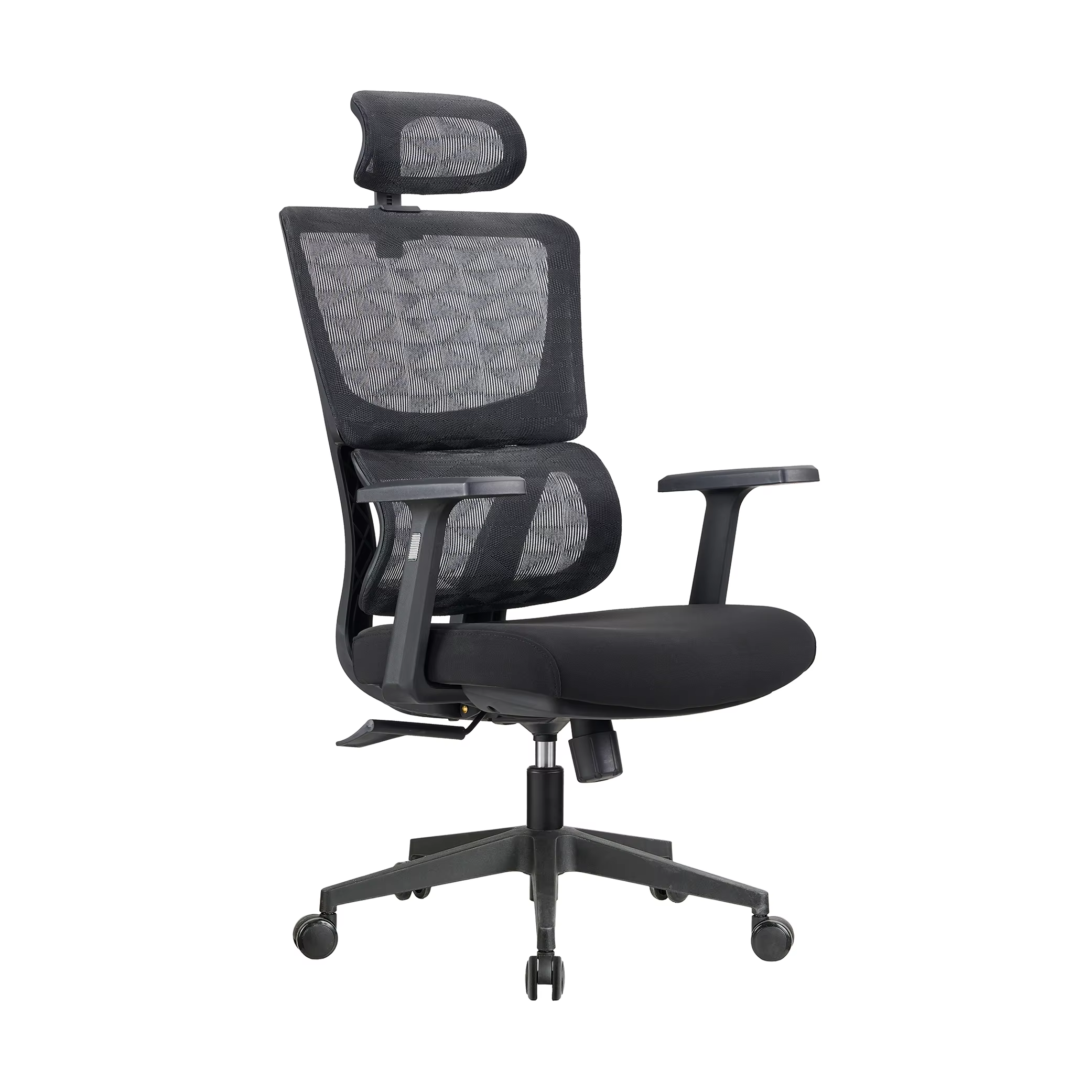
Key Ergonomic Chair Features That Support Prolonged Sitting
Adjustable Height and Spine Alignment
Proper alignment begins with adjustable seat height, positioning hips parallel to knees and reducing lumbar disc pressure by 40% compared to static chairs (University of Michigan Ergonomics, 2023). Precision gas lift mechanisms allow real-time adjustments during typing or screen viewing, preventing shoulder strain from uneven arm positions.
Customizable Seat Depth for Thigh Support
Seat pans with 1—4" sliding ranges eliminate posterior thigh compression by redistributing weight across the buttocks. This prevents numbness in 78% of users sitting more than 4 hours daily while maintaining healthy popliteal circulation, according to research from the Occupational Safety Journal.
Swivel Functionality and Range of Motion
A 360-degree swivel enables access to desk peripherals without spinal twisting, reducing oblique muscle fatigue by 26% in call center trials. When paired with a 15° lateral tilt, it supports natural pelvic movement during collaborative tasks.
Recline Mechanism with Integrated Lumbar Support
A synchronized 30° recline with dynamic lumbar pads maintains thoracic alignment during leaning, reducing disc shear forces by 52% (Biomechanics Institute, 2023). Tension controls let users set resistance based on upper body weight, preventing abrupt backward motion.
Footrests and Full-Body Posture Adjustments
Retractable footrests elevating legs to 15—20° decrease iliac vein pressure by 34 mmHg, per vascular studies. Combined with waterfall seat edges, this reduces calf swelling from 42% to 9% over 8-hour workdays.
How Ergonomic Chairs Promote Healthy Posture and Reduce Pain
Maintaining Natural Spinal Curvature Through Dynamic Support
Good ergonomic chairs are designed to follow the natural S shape of our spines, especially giving support where it matters most - the lower back area. Many models come with adjustable lumbar supports that help maintain that healthy inward curve we all have in our backs, which prevents us from slouching into positions that can actually compress discs over time. What sets these apart from regular office chairs? Their backs aren't fixed in place. Instead, they move along with whoever sits there, making a real difference for people who spend hours at their desks. Research published by Ergonomics International back in 2022 showed something pretty impressive too: workers using such chairs reported about 37% less muscle tiredness after long work sessions compared to those stuck in standard seating options.
Preventing Slouching with Active Backrest Design
Forward-sloping seats and tension-adjustable backrests counteract slumping. A 15° recline encourages micro-movements that engage core muscles, cutting slouching frequency by 52% over an 8-hour day. This promotes upright posture without enforcing rigidity, associated with a 29% lower risk of thoracic kyphosis.
Alleviating Lower Back Pressure and Disc Strain
Adjustable seat depths combined with those waterfall edge designs actually take pressure off the sit bones, which can cut down on lower back disc compression by around 40 percent according to testing. The contoured foam cushions spread out the pressure much better than regular flat seats do, dropping those uncomfortable hot spots by about 26 pounds per square inch. And don't forget about the tilt lock mechanism either. When someone leans forward or reaches for something, this setup really helps reduce the sideways pulling sensation on the spine joints that so many people complain about after sitting too long.
Neck and Upper Back Pain Relief via Headrest Support
Height-adjustable headrests with 45° pivot ranges align cervical vertebrae during recline, decreasing trapezius activation by 33%. This helps prevent tension headaches caused by forward head posture—a factor in 68% of chronic neck pain cases. Breathable mesh also reduces heat buildup, a contributor to upper back stiffness in traditional upholstered chairs.
Pressure Distribution and Circulation Benefits of Ergonomic Seating
Contoured Seats and Foam Density for Hip Joint Relief
Anatomically shaped seats with medium-firm foam (20—25 kg/m³ density) redistribute weight from hip joints to the broader pelvis. This design cuts localized pressure by 40—50% compared to flat seats, minimizing discomfort during full workdays.
Reducing Ischial Tuberosity Pressure with Waterfall Edges
Waterfall-style seat edges eliminate sharp pressure behind the thighs, reducing compression on the ischial tuberosity—the primary load-bearing bone when seated. This lowers sciatic nerve irritation risks by 33% (Occupational Health Journal, 2022).
Seat Angle and Its Impact on Lower Limb Blood Flow
A 5—10° downward seat tilt improves femoral artery blood flow by 18% compared to flat seats. It also prevents popliteal pressure behind the knees, reducing leg swelling and numbness common in static sitting.
Mitigating Metabolic Risks of Prolonged Sitting
Effective pressure distribution and enhanced circulation help lower metabolic syndrome risks tied to sedentary work. Users experience 27% fewer post-meal blood sugar spikes (Clinical Biomechanics, 2023), as better oxygenation supports muscle glucose uptake.
Integrating Ergonomic Chairs Into an Optimal Workspace Setup
Aligning Chair Height with Desk and Monitor Position
Getting the seat height right is important stuff. Feet should be flat on the floor or resting on a footrest, and those knees need to be around 90 to 110 degrees angle wise. Most desks are built for heights between 28 and 30 inches, which means our forearms will stay parallel to whatever surface we're working on. For monitors, they generally want to sit somewhere between 20 and 30 inches from our face, with the top part lined up with our eyes. Some recent research from last year showed that people who set up their workspace like this experience about 34 percent less neck bending forward and roughly 28 percent fewer issues with tired eyes compared to folks whose setups don't match these guidelines properly.
Keyboard Placement and Ambient Lighting Considerations
Maintain a 4"–-6" gap between thighs and keyboard trays to support relaxed shoulders and 90 ° elbow bends. Use anti-glare lighting at 300—500 lux to prevent screen reflections—linked to headaches in 58% of office workers. Combine these with your chair’s lumbar support and swivel base to minimize reaching or squinting.
| Workspace Element | Optimal Position | Common Risk If Misaligned |
|---|---|---|
| Monitor Height | Eye Level | Chronic Neck Strain |
| Keyboard Tray | Elbow Height | Carpal Tunnel Syndrome |
| Ambient Lighting | 300-500 Lux | Migraines & Eye Fatigue |
Productivity, Comfort, and ROI: The Business Case for Ergonomic Chairs
Case Study: Productivity Gains in Tech Companies After Transition
Ergonomic chairs enhance workplace efficiency. A 2022 tech sector analysis revealed employees completed tasks 17.7% faster than those using standard seating, driven by 23% fewer posture-related microbreaks (University of Texas, 2020), enabling sustained focus during intensive coding or design sessions.
Employee Satisfaction and Reduced Absenteeism
Proper lumbar support reduces musculoskeletal disorder (MSD) symptoms by 54%, cutting sick days due to back pain by 67% (American Journal of Public Health, 2021). Employers report 89% higher workstation satisfaction after ergonomic upgrades, improving retention in competitive fields.
Long-Term Cost-Benefit Analysis for Employers
Ergonomic chairs deliver an average 9:1 ROI over five years:
| Cost Factor | Traditional Chairs | Ergonomic Chairs |
|---|---|---|
| Annual Health Claims | $2,400/employee | $760/employee |
| Productivity Loss | 14% | 5% |
| Replacement Cycle | 2 years | 5 years |
This translates to a 79% reduction in workers' compensation costs (Washington State L&I, 2023), establishing ergonomic seating as a strategic workforce investment.
Frequently Asked Questions
What are the key ergonomic features in a chair?
Key ergonomic features in a chair include adjustable height, customizable seat depth, swivel functionality, recline mechanism with lumbar support, and footrests for full-body posture adjustments.
How do ergonomic chairs help in preventing back pain?
Ergonomic chairs help prevent back pain by maintaining natural spinal curvature, providing dynamic support, preventing slouching with active backrest design, and alleviating lower back pressure and disc strain.
Can ergonomic chairs improve productivity?
Yes, ergonomic chairs can improve productivity by enhancing comfort, reducing posture-related microbreaks, and supporting focus during long work sessions, as shown in various studies and case analyses.
How should I integrate an ergonomic chair into my workspace?
To integrate an ergonomic chair effectively, adjust seat height so feet are flat on the floor, align chair height with desk and monitor positions, and ensure proper keyboard placement and ambient lighting considerations.
Table of Contents
- Key Ergonomic Chair Features That Support Prolonged Sitting
- How Ergonomic Chairs Promote Healthy Posture and Reduce Pain
- Pressure Distribution and Circulation Benefits of Ergonomic Seating
- Integrating Ergonomic Chairs Into an Optimal Workspace Setup
- Productivity, Comfort, and ROI: The Business Case for Ergonomic Chairs
- Frequently Asked Questions